Elevate Your Brand with Fast Food Digital Menu Design
In the competitive world of quick-service restaurants and casual dining, the visual presentation of your offerings is just as crucial as the taste. A static, printed board often fails to capture the dynamic nature of a modern menu, which is why digital solutions have become the industry standard. However, a poorly designed digital menu can be just as detrimental as a faded poster. This is where the Fast Food Digital Menu Design creator comes into play, offering a comprehensive solution for businesses that demand a professional, active, and highly customizable visual identity for their food presentations.
This product is not merely a collection of static images; it is a fully realized design ecosystem built for flexibility. The core appeal lies in its ability to transform a standard menu board into an engaging, motion-ready display that captures customer attention. Whether you are a small business owner looking to upgrade your storefront or a designer tasked with branding a new food truck, this tool provides the assets needed to create a polished, commercial-grade result without the steep learning curve of complex animation software.
Anatomy of a Modern Digital Menu Template
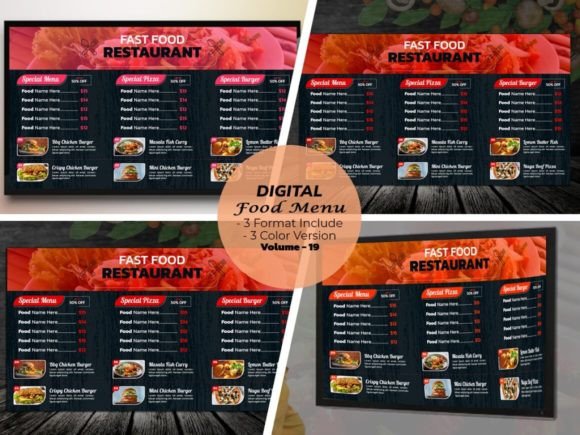
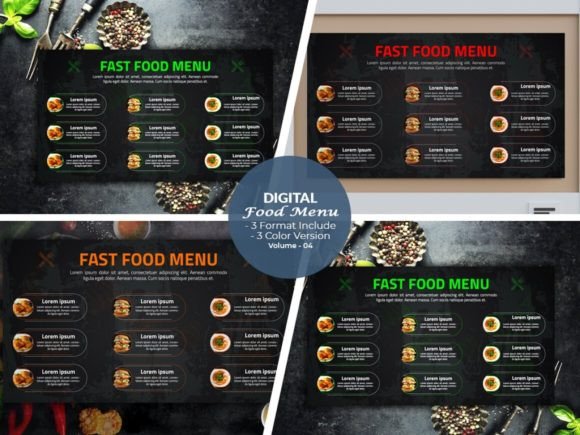
Understanding the technical foundation of the Fast Food Digital Menu Design creator is essential for appreciating its value. The package includes four distinct volume sets, each containing fully editable files in Illustrator Ai, Eps, and Pdf formats. This ensures that you are not locked into a single software environment. The templates are engineered for high-definition output, specifically at a 1920x1080 resolution with 300 DPI, ensuring that your menu items look crisp and appetizing on any large-format screen.
One of the most significant hurdles in design templates is often software compatibility. This asset addresses that by supporting a wide range of Adobe Illustrator versions, from Cs6 up to the latest CC2021+ iterations. This backward compatibility is vital for agencies and freelancers who may be working on different workstations. Furthermore, the inclusion of Photo Use Links streamlines the workflow, allowing you to easily swap out placeholder imagery with your own high-quality food photography, which is the true hero of any menu design.
Visual Style and Aesthetic Flexibility
The visual language of this design creator is rooted in the "active look" that defines modern fast food marketing. It balances bold typography with clean layouts, ensuring that the hierarchy of information—prices, item names, and descriptions—is immediately legible. However, the true strength of this product is its customizability. You are encouraged to customize the color you want, allowing the template to seamlessly integrate with your existing brand identity. Whether your brand palette is fiery reds and yellows or cool, fresh greens and blues, the vector-based files allow for instant color changes without loss of quality.
The aesthetic is designed to be very good looking yet functional. It avoids the clutter that often plagues digital signage. The layout structure supports "combining as you wish," meaning you can rearrange sections to highlight daily specials, combo deals, or seasonal items. This modular approach to digital menu design ensures that the board remains fresh and relevant. It is a perfect example of modern typography meeting practical application, utilizing display font capabilities to grab attention while maintaining the readability of a standard sans serif font for detailed descriptions.
Strategic Applications for Brands and Designers
For the entrepreneur, the Fast Food Digital Menu Design is a tool for direct revenue generation. A well-designed menu does more than list items; it guides the customer’s eye to high-margin products. By utilizing the 3 Color Version Included in the package, you can create distinct moods for different times of the day—perhaps a vibrant, energetic palette for lunch and a warmer, more relaxed tone for dinner service.
For the graphic designer or creative professional, this asset serves as a robust foundation for client projects. Instead of building layouts from scratch, you can use these templates to mock up concepts quickly. The files are fully editable, allowing for deep customization of every element. This is particularly useful for brand identity projects where consistency across web design, social media graphics, and physical signage is paramount. The ability to easily test font pairing within the provided structure helps in refining the overall visual strategy.
Technical Integration and Font Management
Typography can make or break a menu. A common pain point with design assets is missing fonts, which leads to broken layouts and wasted time. This product addresses this by including font information and download links for all typefaces used, including Google Font usage. This ensures that once you open the file, you can immediately install the required fonts and see the design exactly as intended.
The fonts selected for this package are chosen for their performance in digital environments. They are premium fonts that offer high legibility even at varying screen distances. Whether you choose to keep the original typeface or swap it out for a script font or handwritten font to add a personal touch, the file structure supports these changes easily. This flexibility is crucial for packaging design and editorial design extensions, where the menu aesthetic might need to translate to takeaway bags or flyers.
Practical Workflow and Ease of Use
The promise of a "super easy to use" product is often overstated in the design world, but the structure of these templates backs it up. Because the files are vector-based (Ai and Eps), scaling elements or moving them around the 1920x1080 canvas is fluid. You do not need to be an expert in motion graphics to achieve an "active look"; the layout itself creates visual movement through strategic alignment and contrast.
For those managing a small business, the time saved is the most significant benefit. Instead of hiring a freelancer for every minor price change or new product launch, you can open the file, make the edit, export the PDF or image, and upload it to your digital signage system. This autonomy allows for rapid adaptation to market trends. Furthermore, the commercial license typically associated with such assets allows for broad usage, making it a sound investment for long-term branding needs.
Key Specifications at a Glance
- File Formats: Fully editable Ai, Eps, and PDF.
- Resolution: High-definition 1920x1080 at 300 DPI.
- Compatibility: Adobe Illustrator CS6 through CC2021+.
- Customization: Includes 3 color versions and editable photo links.
- Typography: All fonts included with download links (Google Fonts supported).
Ultimately, the Fast Food Digital Menu Design creator bridges the gap between professional design software and the practical needs of the food industry. It provides the visual assets required to build a menu that is not only informative but also an integral part of the customer experience. By combining ease of use with high-end aesthetic standards, it allows users to maintain a competitive edge in a visually driven market.