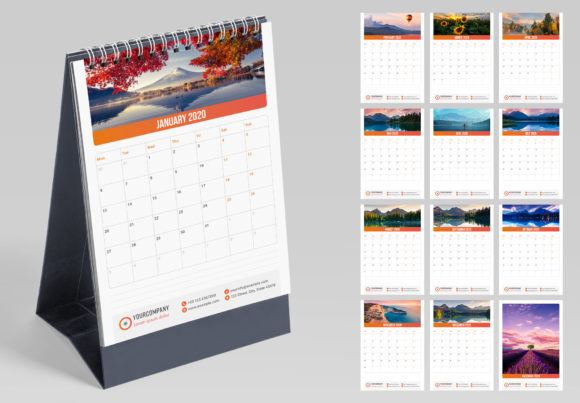
Streamline Your Year: The Vertical Desk Calendar Creative Template
There is a specific kind of satisfaction in planning out a year, month by month, with a physical calendar on your desk. In a digital-first world, the tactile experience of flipping a page to see a new month unfold is surprisingly grounding. For designers, entrepreneurs, and creators, this isn't just about tracking dates; it's an opportunity. A well-designed desk calendar serves as a daily touchpoint for a brand, a functional piece of art, or a thoughtful gift. The challenge, however, lies in the production. Creating a professional, print-ready calendar from scratch is a time-intensive process filled with technical hurdles, from setting up bleeds to managing consistent typography across twelve pages. This is where a robust creative template becomes an indispensable design asset, transforming a complex project into a smooth, enjoyable workflow.
Anatomy of a Professional-Grade Calendar Template
A template's true value isn't just in its initial design, but in its underlying structure. The Vertical Desk Calendar Creative Template is built on a foundation of professional features that save time and eliminate guesswork. It arrives with 12 interior pages and a cover, all formatted to the standard A5 size, a perfect balance of visibility and desk-friendly footprint. Crucially, it’s a layered document, meaning you can isolate and edit elements without affecting the rest of the design. This structure is what makes customization so efficient.
One of the most significant time-savers is the implementation of Character and Paragraph Styles. Instead of manually changing the font, size, and leading for every month’s name or date, you simply apply a pre-made style with a single click. This ensures perfect typographic consistency across the entire calendar and makes global changes effortless. Need to swap out the font for a different brand voice? Just redefine the style, and it updates everywhere. This is a core principle of professional editorial design—maintaining a strict visual hierarchy that guides the eye and enhances readability.
Beyond typography, the template offers powerful color management through Swatches. If a client decides to shift their brand palette or you want to create a seasonal version of the calendar, you can change the primary color scheme across all pages with one click. This feature alone can save hours of tedious editing. The files are delivered in multiple formats, including INDD for Adobe InDesign CC2020+ and IDML for older versions like CS4, ensuring broad compatibility. With 300 DPI resolution and 3 mm bleeds already configured, the technical setup for high-quality commercial printing is handled, leaving you to focus purely on the creative direction.
More Than a Date Keeper: Strategic Applications
The versatility of a well-structured calendar template extends far beyond personal use. For small business owners and marketers, it’s a powerful branding tool. Imagine creating a custom calendar for your clients, featuring your brand’s color palette, photography, and key marketing messages for the year ahead. It’s a high-value gift that keeps your brand on their desk 365 days a year. The template’s clean, modern typography and layout provide a neutral yet sophisticated canvas that can be adapted to almost any industry, from a tech startup to a boutique florist.
For content creators and bloggers, the Vertical Desk Calendar can become a piece of merchandise. You can design it around a specific theme—inspirational quotes, beautiful illustrations, or photography from your travels—and sell it to your audience. The ease of customization means you can quickly produce a new edition each year, building a recurring revenue stream. Similarly, for crafters and hobbyists, it offers a professional framework for creating personalized gifts for family and friends, far surpassing the quality of a typical home-printed project.
Designers can also leverage the template for portfolio projects. Mocking up a calendar design for a fictional or real client demonstrates a capability in packaging design and physical product creation. The template allows you to focus on the creative concept—exploring font pairing strategies, integrating logo design elements, and developing a cohesive visual narrative—without getting bogged down in the technical setup. It’s a practical tool for showcasing how a brand identity can be extended into tangible, everyday objects.
Customization: Making the Template Your Own
The real magic begins when you start tailoring the template to your specific vision. While the provided design is a strong starting point, its potential is unlocked through thoughtful customization. The first step is often refining the typography. The template’s styles make it easy to experiment. You might pair a clean sans serif font for the dates with a more expressive serif font or even a subtle script font for the month titles. This is where you can inject personality. A premium font with unique character details can elevate the entire design, but even free, well-chosen display fonts can create a stunning effect. The key is to test your font pairing for readability at a glance; the numbers and days of the week need to be immediately legible from a short distance.
Color is another powerful lever. Using the Swatches panel, you can experiment with different moods. A monochromatic scheme in a deep navy feels corporate and professional, while a palette of muted pastels gives off a soft, creative vibe. Consider the psychological impact of color on your target audience. For a fitness brand, energizing oranges and greens might be appropriate. For a financial advisor, stable blues and grays convey trust. The one-click color change feature makes this kind of experimentation fast and risk-free.
Finally, think about the content beyond the grid. The cover is prime real estate for a bold statement, a beautiful image, or your logo. The spaces within the monthly spreads offer opportunities for small illustrations, quotes, or even subtle background textures. Because the document is layered, you can add or remove these elements without disrupting the core layout. This flexibility is what separates a generic template from a true design asset. It provides a professional framework that empowers you to create a polished, print-ready product that reflects your unique style or your client’s brand identity with confidence and efficiency.